
Finding a family safety app that alerts both contacts and local community members without exposing your location constantly is difficult. Many apps restrict alerts to saved contacts or require continuous location sharing, reducing privacy or support in public spaces. This list compares features, privacy controls, and coverage so parents and guardians can pick a family safety app that matches their household's needs.
Table of Contents
STREETBLITZ
At a Glance
STREETBLITZ reports alerts reach Community Shield Members within approximately 2km. That reach pushes emergency notices beyond your saved contacts to nearby verified people. The app captures location only when you send a safety flare, avoiding continuous background tracking.
Core Features
You can send instant alerts with location to trusted contacts and nearby Community Shield Members, and share real-time location during an incident. The app offers check-in timers that notify contacts if someone does not confirm on time, plus a family dashboard for coordinated oversight. STREETBLITZ also provides offline access so core safety features remain available with limited connectivity.
Key Differentiator
The standout feature is that alerts go to verified members within that 2km radius rather than only to saved contacts. That radius brings local, real people into a safety loop who can respond faster than distant contacts. This local-first alerting increases the chance of nearby assistance in populated areas.
Pros
Alerts extend beyond personal contacts to verified community members, which broadens who can assist when something happens nearby. The privacy model records location only at the moment a safety flare is sent, so people who worry about constant tracking will find that reassuring. Family management tools let parents monitor multiple profiles from a single family dashboard, and offline functionality keeps core features usable when reception is poor. The app targets individuals and families and offers tiered subscriptions plus free trials for hands-on testing.
Cons
- Relies on community participation; effectiveness falls in areas with few Community Shield Members nearby.
Who It's For
Parents and guardians who want a local safety net for children during walks, travel, or after-school activities will get the most from STREETBLITZ. It suits families who prefer privacy controls that avoid continuous tracking while keeping location-sharing instant when needed. The app also fits people who move through busy urban areas and want immediate local support options.
Unique Value Proposition
The safety flare workflow shares your live location only when activated, not continuously. That approach reduces privacy friction for families while still enabling immediate alerts to both saved contacts and nearby members. For parents, that lowers the barrier to adopting constant monitoring while keeping quick response options available.
Real World Use Case
A parent sets a check-in timer for a teenager walking home after school. The teen triggers a safety flare when a stranger acts suspiciously; nearby verified members and family receive the alert. The parent then tracks the incident on the family dashboard while coordinating a pickup.
Website: https://peershield.com.au
Life360
At a Glance
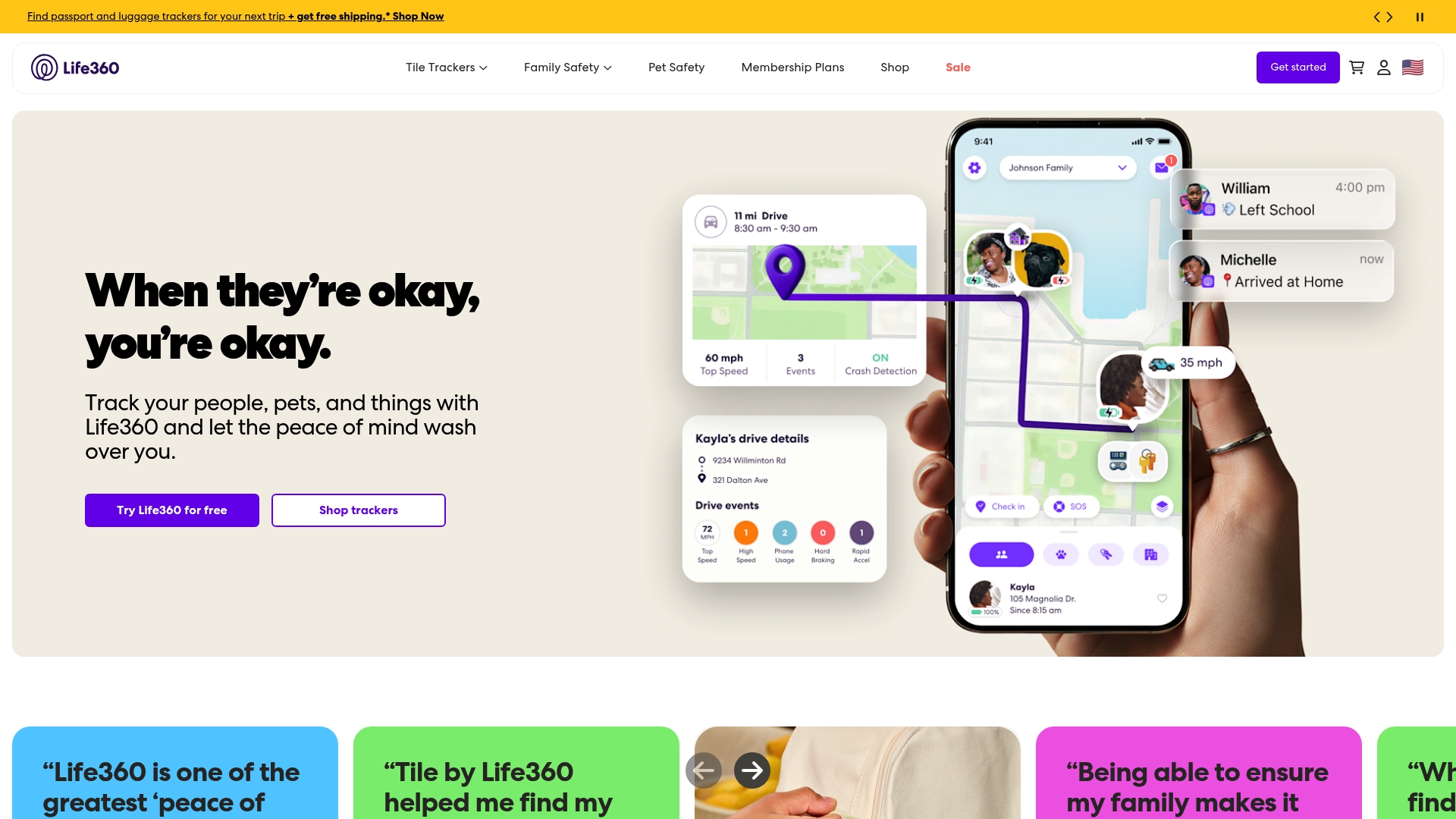
Life360 bundles family location sharing with Tile based trackers and dedicated pet GPS devices, plus crash detection and emergency assistance. The app pairs real time location updates with membership tiers that add features like extended location history and roadside help. That combination makes it a device centred solution for families wanting consolidated tracking and safety tools.
Core Features
Life360 offers real time location sharing and tracking across family circles and paired devices, including Tile based trackers for valuables and pet GPS devices for animals. Premium plans add crash detection and emergency assistance, roadside help, and extended location history, while the mobile app provides driving summaries and discreet alerts. Membership tiers scale from a free basic option to paid Silver, Gold, and Platinum levels that unlock the safety extras.
Key Differentiator
Life360 focuses on synchronising a family’s devices and membership features so parents, carers, and pet owners manage people and items from a single app. That device ecosystem approach contrasts with community alert models that call on nearby strangers for help. Families who want tracked collars, Tile style tags, and family driving reports in one place will find this concentrated device integration useful.
Pros
Life360 centralises multiple tracking needs in one app, so families can see people, pets, and valuables without juggling separate services. The app pairs simple location sharing with safety features such as crash detection and emergency dispatch on paid plans, which suits parents and carers who want a clear safety workflow. The range of membership levels makes it possible to start on the free tier and add features as needs change, and the mobile interface is easy for less tech confident family members to use.
Cons
-
Premium features require ongoing subscriptions and can become costly for families who want crash detection and roadside assistance.
-
Coverage outside major population centres can be limited, which affects tracking reliability in remote areas.
-
Tracker battery life varies by device and may need frequent charging or replacement depending on usage patterns.
-
Location readings are occasionally inaccurate according to user reports, which reduces trust when exact positioning matters.
When It May Not Fit
Life360 is not the right choice for people who want immediate help from local community members rather than family contacts, because it centres on known circles and paired devices. It also suits less well those who travel widely in regions with sparse mobile coverage, since accuracy and connectivity fall in remote areas. Buyers who prefer a one time purchase over a subscription will find the premium feature model unfavourable.
Who It's For
Families with children and pets who want consolidated device tracking and simple safety features will get the most value. Caregivers monitoring elderly relatives and parents checking teen driving habits will appreciate driving summaries and crash detection. People who need a device centred ecosystem for valuables, pets, and family location are the ideal users.
Real World Use Case
Parents install the app and a pet GPS collar, then add Tile style tags to keys and backpacks. The family sees real time locations during school runs and commuter trips, and parents receive a crash detection alert after a collision. Driving summaries help coaches correct risky behaviours with teen drivers during weekly reviews.
Pricing
The basic tier is free with core location sharing. Paid levels are Silver $7.99/month, Gold $14.99/month, and Platinum $24.99/month, each adding incremental safety and history features. The subscription model means ongoing charges for crash detection, roadside assistance, and pet tracking extras.
Website: https://life360.com
Namola
At a Glance
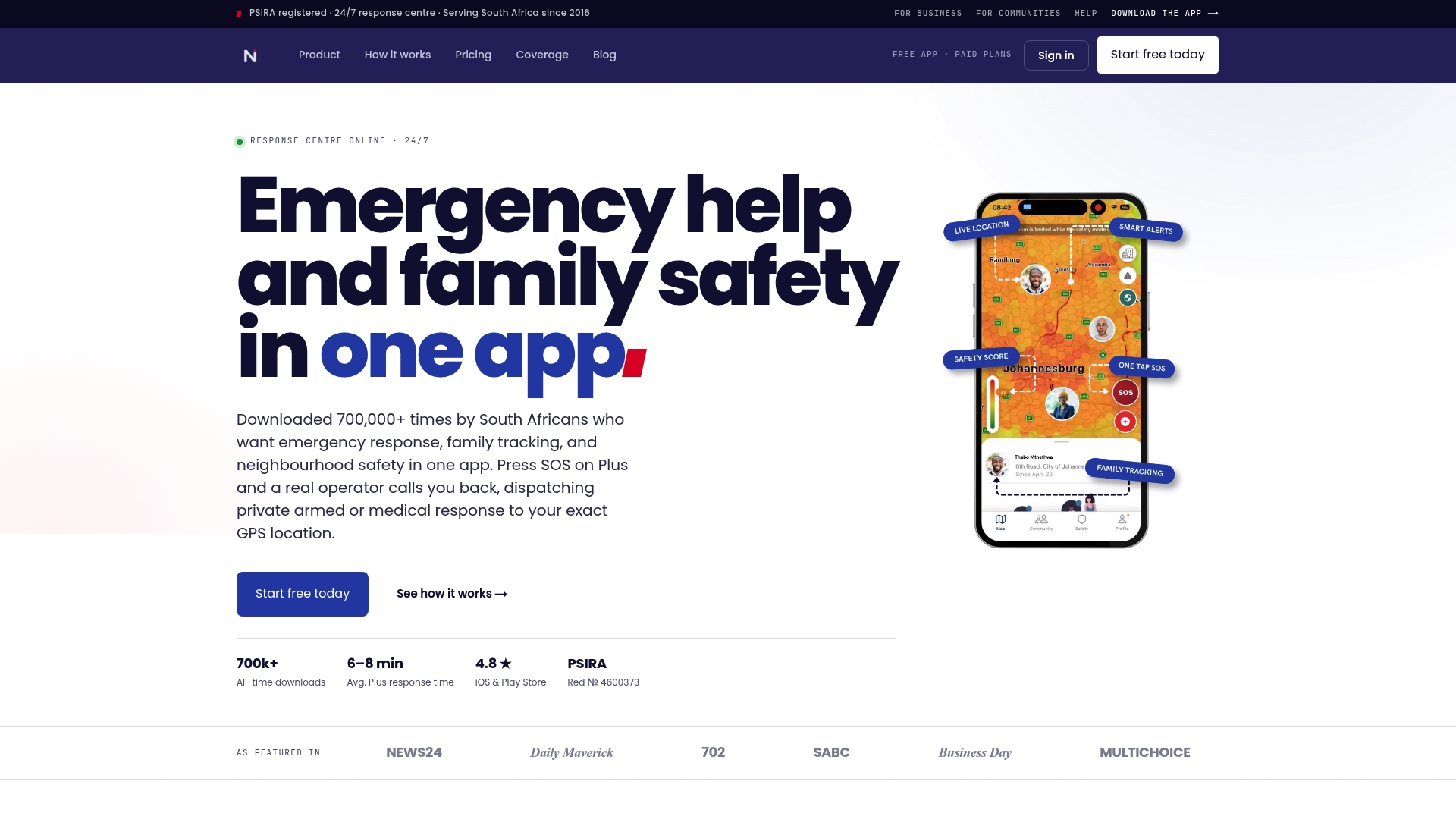
Namola reports more than 700,000 downloads and a 4.8-star rating on app stores. The app is PSIRA registered and runs a 24/7 response centre in Johannesburg. That mix positions it as a neighbourhood safety tool with both private and public dispatch options.
Core Features
Namola pairs emergency help dispatch with a live operator callback, so alerts start with a human check rather than only automated messages. The app includes family tracking with real-time location, geofence alerts for places, and a community watch feed for neighbourhood incident reports. Paid tiers add private armed response and medical dispatch to the existing public emergency links.
Key Differentiator
According to the company, Namola dispatches real-time private armed and medical response directly to your GPS location using South Africa's largest private response network. That claim sets it apart from apps that only notify saved contacts or rely purely on public services. The direct dispatch to an exact GPS point is the core operational advantage.
Pros
Namola can send private armed and medical teams to an exact GPS point and it supports public emergency services as well. The app offers a 24/7 human operator callback rather than a sole automated alert, which reduces false alarms and verifies incidents quickly. Family tracking and a neighbourhood community watch live in the same app, and the vendor advertises plans for UK entry in 2026 which suggests geographic expansion.
Cons
-
Average response time for private emergency assistance is reported at 6–8 minutes, which may be critical in some medical or violent incidents.
-
Private response coverage is still expanding, so some suburbs may only have public dispatch available.
-
Core features rely on mobile data and GPS accuracy, so indoor or low-signal locations can limit effectiveness.
-
Continuous location use affects battery life, though the vendor says impact is minimised.
When It May Not Fit
If you live outside areas with private response partners, you will often get only public dispatch. Communities that need a purely volunteer run neighbourhood platform may prefer a simpler reporting tool without private dispatch tiers. If you need guaranteed subminute response in every location, Namola may not meet that requirement due to variable coverage.
Who It's For
Namola suits South Africans who want a single app that ties family tracking to human-operator emergency dispatch. It fits families who value live callbacks and the option of private armed or medical teams. Neighbourhood associations can use the community watch feed to coordinate local incident reporting.
Real World Use Case
A parent notices their teen has not arrived home and checks the family tracking feed. If the teen presses SOS, an operator calls back immediately and verifies the situation. The nearest private medical unit is then dispatched to the teen's GPS location for on-scene care.
Website: https://namola.com
Comparison of alternatives
Selecting the family safety app is essential to balancing the need for security with usability. Each available app offers a unique set of features tailored to specific lifestyles and scenarios, making comparisons insightful.
Local alerting versus device tracking
While STREETBLITZ excels in its unique localised alerting, which notifies nearby vetted members who can provide immediate assistance, Life360 focuses on tracking solutions. Life360 integrates family location sharing alongside objects and pet tracking devices, benefitting families invested in consolidated monitoring endpoints. Conversely, STREETBLITZ empowers users within urban settings reliant on immediate data diffusion across community networks.
Human integration and reliable response
Namola distinctively integrates human operators to verify emergency situations, ensuring quicker and more accurate deployment of resources. For parents prioritising professionally mediated safeguards against misunderstood or false alerts, this feature may appeal over automatised notifications. Furthermore, Namola’s development goals appear to align with broader adoption across varied regions, suggesting future-proofing possibilities.
Best fit
- Parents seeking localised support in urban regions will find STREETBLITZ for its verified community support mechanism.
- Families requiring an all-in-one solution for tracking individuals, pets, and valuable belongings will benefit from Life360’s device-centred approach.
- Those looking for direct human intervention during emergencies may select Namola for its operator-verified system.
Our pick
STREETBLITZ stands out among family safety apps due to its unique ability to engage nearby community members for immediate assistance. This feature ensures quick response time within urban settings while respecting privacy concerns through selective location-sharing methods. However, for users who prioritise device tracking or direct operator involvement, exploring Life360 or Namola might better meet those specialised requirements.
To assess the ideal choice for family safety solutions, the table below outlines the key features and considerations of three prominent apps in this domain:
| Product | Core feature | Key differentiator | Pricing | Limitation |
|---|---|---|---|---|
| Peershield | Community-based alerts | Safety flares notify local verified members instantly | Price not published | Limited usership in remote areas |
| Life360 | Family location sharing | Integrates pet, device, and vehicle tracking | Free; paid tiers $7.99–$24.99/month | Paid features may become costly over time |
| Namola | Private response network | Links GPS to public/private emergency dispatch | Price not published | Limited response networks in newer locations |
What Makes Family Safety Apps Truly Effective for Local Support
Family safety apps often struggle with either privacy concerns or limited help networks. STREETBLITZ, offered by Peershield, addresses these challenges by alerting verified community members within a 2km radius, not just your saved contacts. This means immediate local assistance becomes possible when you or your family activates a safety flare.
Peershield emphasises privacy by sharing your location only when needed, avoiding constant tracking. Its family dashboard and check-in timers keep parents and guardians connected without feeling intrusive. For families who want a local safety net with clear control over their data, you can learn more about STREETBLITZ and how it balances privacy with quick help at Peershield.
Find out how Peershield brings neighbours closer, so parents and carers gain peace of mind knowing help is nearby and ready to respond.
FAQ
How does Peershield enhance family safety compared to other family safety apps?
Peershield allows you to send instant alerts with location to trusted contacts and nearby Community Shield Members. The app captures location only when you send a safety flare, avoiding continuous tracking. This feature helps keep families connected while maintaining privacy.
What is the difference between Life360 and Peershield?
Life360 offers consolidated tracking through a device-centric ecosystem, including Tile trackers and emergency assistance. Peershield, however, focuses on immediate local support by alerting nearby verified members for faster assistance rather than established contacts alone.
Can I track my family's location offline with Peershield?
Yes, Peershield provides offline access to core safety features, which ensures family location tracking remains available even with poor connectivity. This is especially useful in areas where mobile data may be unreliable.
How quickly does Namola respond to emergencies compared to Peershield?
Namola reports an average response time of 6–8 minutes for private emergency assistance, while Peershield enables alerts to local members who can respond immediately to emergencies. This local-first approach can significantly reduce wait times for help in urgent situations.
What features make Peershield suitable for families?
Peershield includes check-in timers that notify contacts if someone does not confirm on time, a family dashboard, and real-time location sharing. These features are designed to enhance family safety and coordination during outings or activities.